 CrawlPact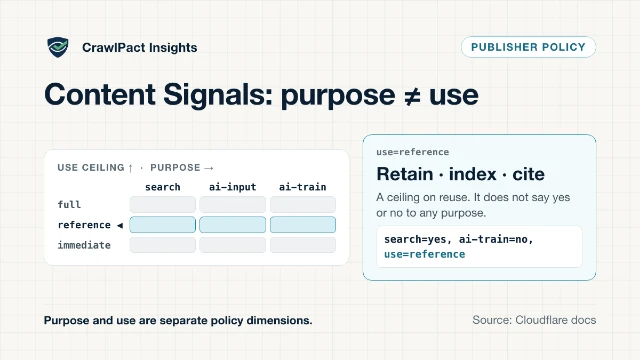
Cloudflare Content Signals use=reference: What immediate, reference and full Mean
Cloudflare's Content Signals use field caps reuse at immediate, reference or full, separate from search, ai-input and ai-train. What it means, and its limits.
AI crawler policy audit and monitoring
See how search, training, user-triggered and agent crawlers are addressed by your website. Detect conflicts, get clear recommendations and monitor future changes — without installing anything.
No installation. No server-log access. No AI API required. Try example.com.
Vendor-neutral
Works with any host or CDN — no website has to move to audit it.
Evidence for every finding
The resource, line and rule behind each interpretation.
22 crawler reference pages
Covering 8 operators, each with an official source and a verification date. Full registry counts are in the Observatory.
Deterministic
Same input, same result. No AI model is used to judge your policy.
Why it matters
Operators increasingly run separate crawlers for separate purposes. Blocking a training crawler is a different decision from blocking a search crawler — and a broad rule written for one can quietly catch the other.
Not every website needs the same policy, and not all AI crawling is unwanted — the point is knowing, with evidence, what your website currently declares.
Index pages so they can appear in search and AI answer experiences.
Collect content that may be used to develop or train models.
Fetch a specific page because a person asked a product to, in real time.
Act on a page as part of an automated or semi-automated task.
5 further documented crawlers are classified as advertising and validation, research, mixed or unknown purposes. Every entry links to its operator's own documentation — see the AI crawler directory.
The proof boundary
Every CrawlPact result keeps three things apart, so a report never claims more than its evidence supports.
robots.txt groups, robots meta, X-Robots-Tag, RSL and Content Signals, read exactly as published.
Status codes, redirects, content types and the exact lines matched, with retrieval timestamps.
Proving this needs your server or CDN logs. A public audit cannot see it, so CrawlPact never claims it.
Read the full limitations before relying on a result for a business decision.
How CrawlPact works
CrawlPact retrieves bounded public policy resources — nothing to install, no log access.
Search, training, user-triggered and agent crawlers are evaluated and shown separately.
Each finding carries its evidence, an explanation and a copyable recommendation.
Paid plans recheck on a schedule and record website and registry changes.
Sample report · synthetic data
Illustrative example using a synthetic demonstration domain — not a real scan result. Every finding follows the same order: what happened, why it matters, the evidence, the action, and the limitation.
Sample report — synthetic domain, not a real scan
sample-domain.example (demonstration data)
Completed with warnings| Crawler | Purpose | Declared result | Matched rule |
|---|---|---|---|
| OAI-SearchBot | Search | Allowed | Allow: / (line 4) |
| GPTBot | Training | No explicit rule | — |
| ClaudeBot | Training | Blocked | Disallow: / (line 12) |
| Google-Extended | Training | Blocked | Disallow: / (line 12) |
| ChatGPT-User | User-triggered | Allowed | Allow: / (line 4) |
Example finding: GPTBot has no explicit rule
robots.txt does not name GPTBot in any User-agent group, so no explicit rule currently applies to it.
The selected objective ("Allow search, block training") intends to restrict model-training crawlers, but an unaddressed crawler is not the same as an explicit block.
robots.txt, fetched 2026-08-01 — no User-agent group names GPTBot.
Add an explicit Disallow rule naming GPTBot's user-agent token.
CrawlPact cannot confirm whether GPTBot actually requests this website — only that no rule currently addresses it.
Monitoring
Saved domains are rechecked on a schedule, and every change is attributed to its cause — your website, or what CrawlPact knows about crawlers.
Monitoring frequency depends on your plan — see pricing. Changes surface in an in-app notification centre and a private Atom feed.
First scan establishes the declared policy
A deployment rewrites robots.txt
An operator documents a new crawler token
Scheduled scan confirms the current state
For agencies and multi-site teams
Save every client domain in one place, apply objective-based recommendations, and monitor for website or registry changes — without exposing internal tooling to clients.
Free tools
Each tool runs the same real audit and opens the report at the section you care about — no separate, simplified logic.
Supported public signals
Primary signals (robots.txt, HTTP headers, HTML meta directives) are checked on every scan. Optional and emerging signals are checked when publicly available; support depth varies with each specification's maturity, and none is required for AI visibility.
How each signal is parsed and weighed is documented in the methodology.
Evidence, in the open
CrawlPact has no testimonials or logo wall to show you. It publishes the method, the sources, the failures and the limits instead — check any of them before you trust a result.
| Record | What it shows |
|---|---|
| Methodology | How every signal is retrieved, parsed and weighed |
| Crawler directory | Each crawler's operator, purpose, official source and verification date |
| Status | Live service status and the incident history, including past failures |
| Security | Scanner containment, data handling and how to report a vulnerability |
| About | Who operates CrawlPact and what it will and will not do |
| Corrections process | How to report a wrong classification, and how fixes are published |
Research and analysis
Source-backed analysis of changes in AI crawlers, search reporting, and publisher controls — plus reproducible research from the public registry.
Cloudflare's Content Signals use field caps reuse at immediate, reference or full, separate from search, ai-input and ai-train. What it means, and its limits.
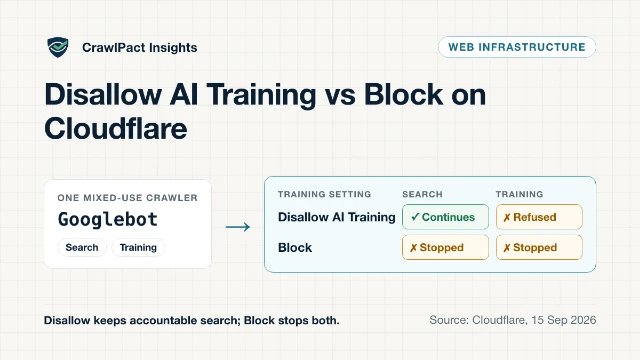
Cloudflare's Disallow AI Training keeps accountable mixed-use crawlers such as Googlebot for search while refusing training. How it differs from Block.
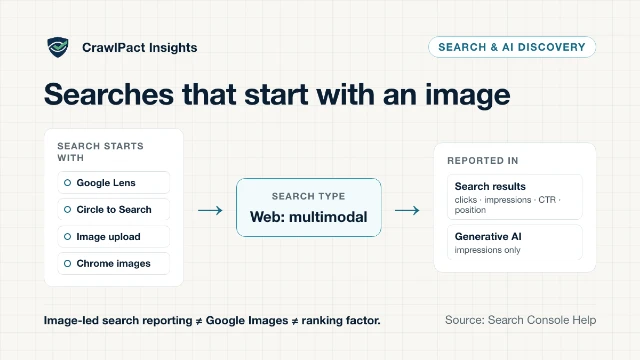
Search Console now splits web multimodal searches (Lens, Circle to Search, image uploads) from text queries. What the data shows, and what it cannot prove.
Plans
Monthly and yearly pricing. Billing is handled by Paddle; applicable taxes may be calculated during checkout.
For a one-time check on a single site.
Scan a websiteFor individual site owners tracking one project.
Start monitoringFor growing portfolios that need weekly monitoring.
Choose ProFor agencies managing many client domains.
Choose AgencyFAQ
Short, factual answers. The long versions live in the methodology and limitations.
Free public audit
Run a free public audit. No account or installation required.
Results describe published policy signals and do not guarantee crawler behaviour.
View a sample reportAnalytics preferences
CrawlPact uses optional Google Analytics and Microsoft Clarity on public pages to learn which content is useful. Clarity records clicks and scrolling (session replay), with anything you type masked. Neither runs in the app or admin areas, and CrawlPact works the same whether you accept or decline. See the privacy policy.