 CrawlPact
Insight · Search & AI discovery
Google Multimodal Search Reporting: What Lens, Circle to Search and Image Queries Reveal
Search Console now splits web multimodal searches (Lens, Circle to Search, image uploads) from text queries. What the data shows, and what it cannot prove.
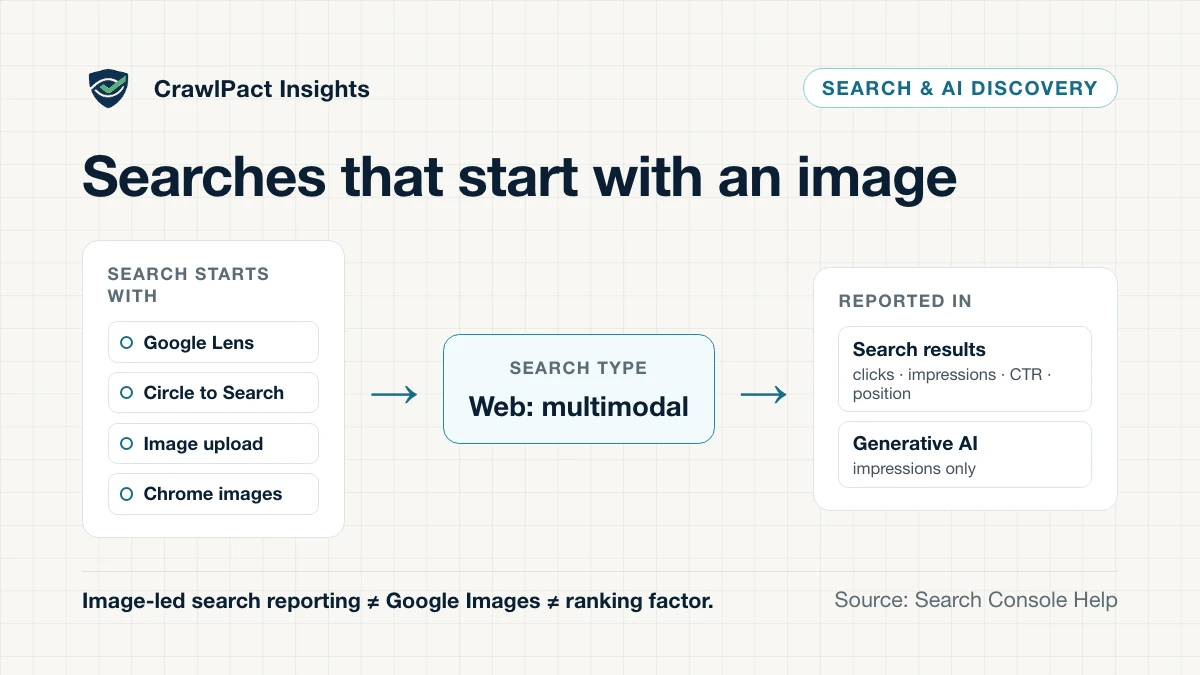
On 24 September 2026 Google added a Web: multimodal search type to Search Console. It isolates searches that start with an image instead of typed words: Google Lens, Circle to Search on Android, an image uploaded to Google Search, and Chrome’s right-click “Search this image”. The filter exists in two places — the Performance report for Search results and the Generative AI performance report — and Google’s announcement says the data is “rolling out globally starting today”, appearing only when a site actually receives traffic from these searches.
Key takeaway. Web: multimodal is a new way of segmenting Search data, not a new ranking system. It shows which of your pages are surfaced when someone searches with an image. It does not show why, and it does not score your images.
What Google added
Google’s help page now defines the Performance report’s search types like this:
- Web: text-based — “search traffic originating from text queries entered into the standard Google search bar”;
- Web: multimodal — search traffic “when users search using images (such as with a smartphone camera)”, including “Google Lens, Circle to Search on Android, uploaded images, and Chrome image search”;
- Image — traffic “from results shown in the Google Images tab”;
- Video and News — their own tabs.
The same text-based and multimodal split is a filter in the generative AI performance report, which covers AI Overviews and AI Mode. Both reports can be exported.
Four views that answer four different questions
The easy mistake is to treat “visual search” as one number. Search Console now gives you at least four distinct views, and each one supports a different conclusion:
| Reporting surface | What “multimodal” means here | Available measurements | Best question | Wrong conclusion |
|---|---|---|---|---|
| Search results, Web: text-based | Not multimodal: the search started with typed text | Clicks, impressions, CTR, average position; queries, pages, etc. | Which typed searches bring people to which pages? | “Text and image demand behave the same” |
| Search results, Web: multimodal | The search started with an image (Lens, Circle to Search, …) | Clicks, impressions, CTR, average position by page, device, etc. | Which pages earn web visits when people search with an image? | “This is my Google Images traffic” |
| Search results, Image | Not a search-start type: results shown in the Google Images tab | Clicks, impressions, CTR, average position | How do my images perform inside the Images tab? | “Images-tab success means Lens success” |
| Generative AI report, Web: multimodal | Image-started searches where a link appeared in AI Overviews or AI Mode | Impressions only, by page, country, device, date | Where do image-started searches surface my links in AI features? | “My images earned AI citations” or “an AI ranking score” |
The second and third rows are the ones most often merged. Web: multimodal is defined by how the search began; Image is defined by where the result was shown. A Lens search that returns ordinary web results is multimodal, not Image; a typed search in the Images tab is Image, not multimodal.
The last row has a narrower measurement model. Google defines the generative AI report’s metric as impressions — “how many times links to your site were shown to a user in a generative AI feature on Google Search” — with no clicks, CTR, position or query dimension.
What the reports do not say
Two gaps are worth knowing before you build a dashboard.
The query. Search Console describes the Queries dimension as grouping data “by the search query users typed”. An image-started search has no typed query, and Google’s help pages do not explain what, if anything, appears in that dimension for Web: multimodal traffic. Read page, device and country data for this search type, and treat any query rows cautiously until Google documents them.
The reason. Neither report exposes why a page was selected. There is no image-quality score, no “Lens ranking factor” and no multimodal authority metric. Google’s announcement presents the change as reporting — “to give you insights into how your content is surfaced” — not as a new way pages are ranked.
A practical analysis workflow
- Start after the rollout. The filter arrived on 24 September 2026, so earlier periods are not comparable; give it several weeks of data before drawing conclusions.
- Compare Web: multimodal with Web: text-based for the same pages. Pages that over-index in multimodal traffic are the ones whose visual content matters to discovery.
- Segment by device. Lens and Circle to Search are camera- and screen-led; a mobile skew is often expected, while desktop multimodal traffic may point to Chrome’s image search instead.
- Segment by country only where volumes are large enough to be stable.
- Check the same pages in the generative AI report’s multimodal view — as an additional visibility signal, never added to Search results numbers.
- Open the pages. Ask whether the image is central to the reader’s task, and whether the text around it explains what the image shows.
Search Console’s usual mechanics still apply: impressions are counted per Google’s own rules, average position is the topmost position of your link, chart totals and table rows can be aggregated differently, and the newest data can be preliminary.
What to improve on pages that earn image-led visits
Google’s image SEO guidance does not mention Lens or multimodal search specifically, but it is Google’s general guidance for images appearing in Search features, and its basics apply:
- embed images with HTML
<img>elements — Google says it “doesn’t index CSS images”; - place images “near relevant text and on pages that are relevant to the image subject matter”;
- write useful, descriptive alt text — Google uses it “along with computer vision algorithms and the contents of the page”;
- prefer descriptive filenames, high resolution and no extreme aspect ratios.
The page around the image still matters. Google’s generative AI guidance says SEO best practices “continue to be relevant” for AI Overviews and AI Mode; nothing in the new reporting suggests that a striking image on a thin page will be surfaced, or that visual content automatically earns visibility in AI features.
Where CrawlPact fits
CrawlPact audits the public crawler-policy signals a website declares — robots.txt groups, the
homepage’s robots meta and X-Robots-Tag directives and related declarations (see the
methodology). It does not see Search Console data, measure Lens or multimodal
visibility, or score images.
The connection is access. Image-led discovery still depends on Google being able to crawl and
index the page and its images; a robots.txt rule or noindex that shuts Googlebot out undermines
it regardless of image quality. Those declared signals are what a CrawlPact audit shows.
The takeaway
Web: multimodal makes image-started discovery measurable for the first time. Use it to find the pages people reach by pointing a camera, circling something on screen or searching with an image — and keep it separate from the Google Images tab and from the generative AI report’s impressions-only view. It is a measurement lens, not a ranking system. For how Google’s reporting differs from Microsoft’s, see Google vs Bing AI search visibility.
Sources
Claims about vendors, protocols and standards trace to these sources, last verified . Statements about CrawlPact's own systems are CrawlPact's first-party observations.
- Announcing web multimodal Search performance reporting in Search ConsoleGoogle Search Central Blog · Official documentation
- Performance report (Search results)Google Search Console Help · Official documentation
- Generative AI performance report (Search)Google Search Console Help · Official documentation
- What are impressions, position, and clicks?Google Search Console Help · Official documentation
- Google image SEO best practicesGoogle Search Central · Official documentation
- Optimizing your website for generative AI features on Google SearchGoogle Search Central · Official documentation
Related CrawlPact resources
Check what your website currently declares to crawlers
CrawlPact audits the public crawler-policy signals a site exposes — robots.txt groups, robots meta and X-Robots-Tag directives, and related declarations — against a source-backed crawler registry. It does not guarantee crawler compliance, search ranking or AI citation, and it does not measure actual crawler traffic.
Audit a domainSpotted an error or an outdated source? Report it through CrawlPact's corrections process.