 CrawlPact
Insight · AI crawler ecosystem
Web Bot Auth: Why User-Agent Strings Are Not Enough to Verify AI Agents
A User-Agent header is a claim anyone can copy. Web Bot Auth signs bot requests with HTTP Message Signatures: proof of identity, never a grant of permission.
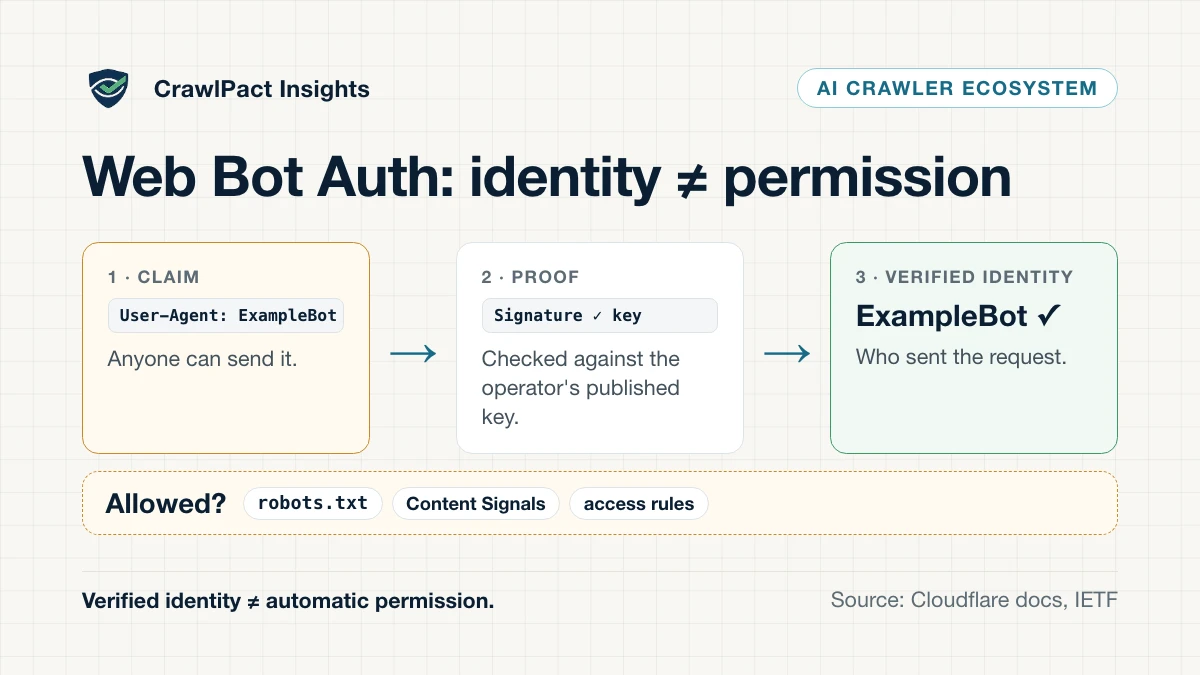
A User-Agent header is a claim. Any HTTP client can send Googlebot, GPTBot or any other
name, and Google itself warns that the header Googlebot uses “is often spoofed by other crawlers”.
Web Bot Auth is an emerging way to turn that claim into evidence: the bot operator signs each
request with a private key, publishes the matching public key, and the receiving side verifies the
signature.
That solves an identity problem. It does not solve a permission problem. A request can be genuinely signed by a known operator and still be one your site does not allow.
Key takeaway. Authentication answers who sent a request. Policy answers what they may do. A verified bot is an identified bot, not an allowed one.
Why the User-Agent header is weak evidence
The User-Agent header was designed to describe a client, not to authenticate it. Well-behaved
crawlers identify themselves consistently, which is why robots.txt matches on their tokens — but
nothing in the header stops imitation.
Google’s guidance is a useful first-party example. Before blocking Googlebot, Google says, “it’s important to verify that a problematic request actually comes from Google”, and it documents two ways to do so: a reverse DNS lookup on the requesting IP followed by a forward lookup to confirm it, or matching the IP against Google’s published crawler IP ranges.
Four kinds of identity evidence
| Method | Evidence | Strength | Limits |
|---|---|---|---|
User-Agent string |
A self-declared name in the request | Useful for matching; proves nothing | Trivially copied |
| Reverse + forward DNS | The IP resolves to the operator’s domain, and back again | Strong for operators that publish domains | Needs DNS lookups per IP; ties identity to infrastructure |
| Published IP ranges | The IP is in a list the operator publishes (for example Google’s JSON files) | Strong while the list is accurate | Lists change; shared or cloud IPs complicate it; Cloudflare requires IPs used solely by the bot owner |
| Web Bot Auth signature | A cryptographic signature checked against the operator’s published key | Strong; independent of IP address | Requires operator adoption; built on evolving drafts |
Cloudflare accepts the last three for its Verified bots programme: “a cryptographic Web Bot Auth signature, a published IP list with a stable user-agent, or reverse DNS”.
How Web Bot Auth works
Cloudflare’s implementation, as documented on 2 October 2026, has four steps:
- Generate a key. The operator creates an Ed25519 key pair; the private key stays secret.
- Host a key directory at
/.well-known/http-message-signatures-directory, over HTTPS, serving the public key as a JSON Web Key Set. The directory response is itself signed, which Cloudflare says “ensures no one else can mirror your directory and attempt to register on your behalf”. - Register the bot and its directory with the verifier — for Cloudflare, through its bot submission form.
- Sign every request with three headers built on HTTP Message Signatures (RFC 9421):
Signature-Agent(where the key directory lives),Signature-Input(which components were signed, pluscreated,expires,keyid, anonceandtag="web-bot-auth") andSignature(the signature itself). Cloudflare recommends signing at least@authority, the host being requested.
An illustrative request, shortened from Cloudflare’s documentation:
Signature-Agent: "https://signature-agent.test"
Signature-Input: sig2=("@authority" "signature-agent");created=1735689600;
  keyid="poqkLGiymh_W0uP6PZFw-dvez3QJT5SolqXBCW38r0U";alg="ed25519";
  expires=1735693200;tag="web-bot-auth"
Signature: sig2=:jdq0SqOwHdyHr9+r5jw3iYZH6aNGKijYp/EstF4RQTQdi5N5YYKrD+mCT1HA1nZDsi6nJKuHxUi/5Syp3rLWBA==:
An impersonator can copy the User-Agent and even the Signature-Agent URL. Without the private
key, it cannot produce a valid signature.
The limits that still matter
Replay. Cloudflare recommends a nonce, but says “there is currently no nonce validation, nor
does Cloudflare guard against replay attacks using a database of seen nonces.” Its defence is a
short expires — “a minute is often sufficient”.
Partial support. Cloudflare’s implementation does not support every RFC 9421 component and
parameter; signing @query-params or @status, or using the sf, bs, key, req or name
parameters, makes verification fail.
Moving drafts. Cloudflare’s documentation implements specific individual drafts — the key
directory from draft-meunier-http-message-signatures-directory-03 and the protocol from
draft-meunier-web-bot-auth-architecture-02 — and rejects the Signature-Agent “dictionary form
from later drafts”. Meanwhile the work has moved into an IETF working group: webbotauth is an
active working group, and its document draft-ietf-webbotauth-httpsig-protocol (version 00, last
updated 1 September 2026) is an Internet-Draft, not an RFC. Expect the wire format to keep changing,
and validate against current documentation rather than an old example.
Verified does not mean allowed
Cloudflare’s definition of a Verified bot has two bars: “honest self-identification” and
“non-abusive behavior” — it “obeys robots.txt and crawl directives, maintains reasonable request
rates, and has not been observed evading website owner preferences”. Breaking the policy can remove
a bot from the allowlist.
Since 1 July 2026 Cloudflare has also separated identity from access explicitly: “we are no longer viewing Verified as ‘default allowed.’ Now, the Verified label makes a bot allowable with its relevant category, meaning the allowed category (e.g., allowing Search) will determine what is allowed to access a website.”
That gives the three layers every automated-traffic policy needs:
| Layer | Question | Examples |
|---|---|---|
| Identity | Who sent this request? | Web Bot Auth signature, reverse DNS, published IP ranges |
| Purpose | Why is the automation here? | Search, training, agent — Cloudflare classifies these as behaviours |
| Permission | What may it access or do? | robots.txt, Content Signals, WAF and access rules, authenticated application permissions |
Collapsing them produces bad rules. Blocking anything whose User-Agent “looks like AI” is weaker
than verifying who is asking and then applying an explicit, purpose-aware decision.
When the operator is not the requester
An agent at your door is often run by a platform on behalf of many end users. Cloudflare labels
Verified bots Direct (one narrow operator) or Intermediary (a service many end users
operate), and calls the resulting chain — site owner, operator, end user — transitive trust. It is
experimenting with carrying the operator’s identity, and the content-use level it commits to, in
the Forwarded header from RFC 7239 (for example Forwarded: for="openai";use="reference"), and
says this “is experimental and may change”.
What to do with this today
- Site owners: don’t make identity-sensitive allow or block decisions from
User-Agentalone when stronger evidence exists. For Googlebot, use Google’s verification methods; behind Cloudflare, use its verified-bot signals rather than rebuilding heuristics. Keep identity separate from policy, and log which evidence and which rule produced each decision. - Bot and agent operators: use one stable identity per purpose, keep the key directory current,
rotate keys deliberately, sign requests with short expiry — and honour
robots.txtand content preferences, because verification makes behaviour attributable.
Where CrawlPact fits
CrawlPact audits the public crawler-policy signals a website declares — for example, what
robots.txt says should happen when a GPTBot or Googlebot token is encountered — against a
source-backed crawler registry (see the methodology). That is the permission
layer, as declared. CrawlPact does not verify incoming requests, see your traffic, or prove that a
request claiming a token came from that operator; that is the identity layer, and Web Bot Auth,
reverse DNS and IP validation live there. If a rule seems to be ignored, check the common
robots.txt causes first — and remember that a
request merely carrying a crawler’s token may not come from that crawler at all.
The takeaway
The web is moving from “trust the name in the header” towards verifiable automated identity. Web
Bot Auth strengthens the identity layer underneath robots.txt, Content Signals and access rules;
it does not replace any of them. Verify who is asking, understand why, then apply your policy to
that verified context — and treat the protocol as an evolving draft, not a finished standard.
Sources
Claims about vendors, protocols and standards trace to these sources, last verified . Statements about CrawlPact's own systems are CrawlPact's first-party observations.
- Web Bot AuthCloudflare Docs · Official documentation
- Verified botsCloudflare Docs · Official documentation
- IP validationCloudflare Docs · Official documentation
- Your site, your rules: new AI traffic options for all customersCloudflare Blog · Official documentation
- HTTP Message Signatures for automated traffic (draft-ietf-webbotauth-httpsig-protocol)IETF Datatracker · Official documentation
- RFC 9421: HTTP Message SignaturesRFC Editor · Official documentation
- GooglebotGoogle Search Central · Official documentation
- Verify requests from Google crawlers and fetchersGoogle Crawling Infrastructure · Official documentation
Related CrawlPact resources
Check what your website currently declares to crawlers
CrawlPact audits the public crawler-policy signals a site exposes — robots.txt groups, robots meta and X-Robots-Tag directives, and related declarations — against a source-backed crawler registry. It does not guarantee crawler compliance, search ranking or AI citation, and it does not measure actual crawler traffic.
Audit a domainSpotted an error or an outdated source? Report it through CrawlPact's corrections process.